---
weight: 1
title: Quick Start
menu:
docs:
parent: "anomaly-detection"
identifier: "vmanomaly-quick-start"
weight: 1
title: Quick Start
tags:
- metrics
- enterprise
- guide
aliases:
- /anomaly-detection/QuickStart.html
---
For a broader overview please visit the [navigation page](https://docs.victoriametrics.com/anomaly-detection/).
## How to install and run vmanomaly
> To run `vmanomaly`, you need to have VictoriaMetrics Enterprise license. You can get a trial license key [**here**](https://victoriametrics.com/products/enterprise/trial/).
The following options are available:
- [To run Docker image](#docker)
- [To run in Kubernetes with Helm charts](#kubernetes-with-helm-charts)
- [To run with VM Operator](#vm-operator)
> Anomaly detection models can be kept {{% available_from "v1.13.0" anomaly %}} **on host filesystem after `fit` stage** (instead of default in-memory option); This will drastically reduce RAM for larger configurations. Similar optimization {{% available_from "v1.16.0" anomaly %}} can be applied to data read from VictoriaMetrics TSDB. See instructions of how to enable it [here](https://docs.victoriametrics.com/anomaly-detection/faq/#on-disk-mode).
### Command-line arguments
The `vmanomaly` service supports a set of command-line arguments to configure its behavior, including options for licensing, logging levels, and more.
> `vmanomaly` supports {{% available_from "v1.18.5" anomaly %}} running on config **directories**, see the `config` positional arg description in help message below.
> Single-dashed command-line argument {{% available_from "v1.23.3" anomaly %}} format can be used, e.g. `-license.forceOffline` in addition to `--license.forceOffline`. This aligns better with other VictoriaMetrics ecosystem components. Mixing the two styles is also supported, e.g. `-license.forceOffline --loggerLevel INFO`.
```shellhelp
usage: vmanomaly.py [-h] [--license STRING | --licenseFile PATH] [--license.forceOffline] [--loggerLevel {DEBUG,WARNING,FATAL,ERROR,INFO}] [--watch] [--dryRun] [--outputSpec PATH] config [config ...]
VictoriaMetrics Anomaly Detection Service
positional arguments:
config YAML config file(s) or directories containing YAML files. Multiple files will recursively merge each other values so multiple configs can be combined. If a directory is provided,
all `.yaml` files inside will be merged, without recursion. Default: vmanomaly.yaml is expected in the current directory.
options:
-h Show this help message and exit
--license STRING License key for VictoriaMetrics Enterprise. See https://victoriametrics.com/products/enterprise/trial/ to obtain a trial license.
--licenseFile PATH Path to file with license key for VictoriaMetrics Enterprise. See https://victoriametrics.com/products/enterprise/trial/ to obtain a trial license.
--license.forceOffline
Whether to force offline verification for VictoriaMetrics Enterprise license key, which has been passed either via -license or via -licenseFile command-line flag. The issued
license key must support offline verification feature. Contact info@victoriametrics.com if you need offline license verification.
--loggerLevel {DEBUG,WARNING,FATAL,ERROR,INFO}
Minimum level to log. Possible values: DEBUG, INFO, WARNING, ERROR, FATAL.
--watch Watch config files for changes and trigger hot reloads. Watches the specified config file or directory for modifications, deletions, or additions. Upon detecting changes,
triggers config reload. If new config validation fails, continues with previous valid config and state.
--dryRun Validate only: parse + merge all YAML(s) and run schema checks, then exit. Does not require a license to run. Does not expose metrics, or launch vmanomaly service(s).
--outputSpec PATH Target location of .yaml output spec.
```
You can specify these options when running `vmanomaly` to fine-tune logging levels or handle licensing configurations, as per your requirements.
### Licensing
The license key can be specified with the help of the following [command-line](#command-line-arguments) arguments: `--license`, `--licenseFile`, `--license.forceOffline`
In order to make it easier to monitor the license expiration date, the following metrics are exposed (see
[Monitoring](https://docs.victoriametrics.com/anomaly-detection/components/monitoring/) section for details on how to scrape them):
```promtextmetric
# HELP vm_license_expires_at When the license expires as a Unix timestamp in seconds
# TYPE vm_license_expires_at gauge
vm_license_expires_at 1.6963776e+09
# HELP vm_license_expires_in_seconds Amount of seconds until the license expires
# TYPE vm_license_expires_in_seconds gauge
vm_license_expires_in_seconds 4.886608e+06
```
Example alerts for [vmalert](https://docs.victoriametrics.com/victoriametrics/vmalert/):
```yaml
groups:
- name: vm-license
# note the `job` label and update accordingly to your setup
rules:
- alert: LicenseExpiresInLessThan30Days
expr: vm_license_expires_in_seconds < 30 * 24 * 3600
labels:
severity: warning
annotations:
summary: "{{ $labels.job }} instance {{ $labels.instance }} license expires in less than 30 days"
description: "{{ $labels.instance }} of job {{ $labels.job }} license expires in {{ $value | humanizeDuration }}.
Please make sure to update the license before it expires."
- alert: LicenseExpiresInLessThan7Days
expr: vm_license_expires_in_seconds < 7 * 24 * 3600
labels:
severity: critical
annotations:
summary: "{{ $labels.job }} instance {{ $labels.instance }} license expires in less than 7 days"
description: "{{ $labels.instance }} of job {{ $labels.job }} license expires in {{ $value | humanizeDuration }}.
Please make sure to update the license before it expires."
```
### Docker
> To run `vmanomaly`, you need to have VictoriaMetrics Enterprise license. You can get a trial license key [**here**](https://victoriametrics.com/products/enterprise/trial/).
> Due to the upcoming [DockerHub pull limits](https://docs.docker.com/docker-hub/usage/pulls), an additional image registry, **Quay.io**, has been introduced for VictoriaMetrics images, including [`vmanomaly`](https://quay.io/repository/victoriametrics/vmanomaly). If you encounter pull rate limits, switch from:
> ```
> docker pull victoriametrics/vmanomaly:vX.Y.Z
> ```
> to:
> ```
> docker pull quay.io/victoriametrics/vmanomaly:vX.Y.Z
> ```
Below are the steps to get `vmanomaly` up and running inside a Docker container:
1. Pull Docker image:
```sh
docker pull victoriametrics/vmanomaly:v1.28.7
```
2. Create the license file with your license key.
```sh
export LICENSE_KEY=YOUR_LICENSE_KEY
echo $LICENSE_KEY > license
```
3. Create and modify your `config.yaml` file to your liking. An example can be found [here](https://docs.victoriametrics.com/anomaly-detection/quickstart/#example)
4. Start the `vmanomaly` Docker container with a *license file*, use the command below.
**Make sure to replace `YOUR_LICENSE_FILE_PATH`, and `YOUR_CONFIG_FILE_PATH` with your specific details**:
```sh
docker run -it \
-v ./license:/license \
-v ./config.yaml:/config.yaml \
-p 8490:8490 \
victoriametrics/vmanomaly:v1.28.7 \
/config.yaml \
--licenseFile=/license \
--loggerLevel=INFO \
--watch
```
Use the below configuration if settings.restore_state is True (vmanomaly runs in [stateful](https://docs.victoriametrics.com/anomaly-detection/components/settings/#state-restoration) mode) or [on-disk mode](https://docs.victoriametrics.com/anomaly-detection/faq/#on-disk-mode) is preferred over in-memory.
```sh
docker run -it \
-v ./license:/license \
-v ./config.yaml:/config.yaml \
-v vmanomaly_data:/tmp/vmanomaly \
-e VMANOMALY_DATA_DUMPS_DIR=/tmp/vmanomaly/data \
-e VMANOMALY_MODEL_DUMPS_DIR=/tmp/vmanomaly/models \
-p 8490:8490 \
victoriametrics/vmanomaly:v1.28.7 \
/config.yaml \
--licenseFile=/license \
--loggerLevel=INFO \
--watch
```
```yaml
# docker-compose.yml file
services:
# ...
vmanomaly:
container_name: vmanomaly
image: victoriametrics/vmanomaly:v1.28.7
# ...
restart: always
volumes:
- ./config.yaml:/config.yaml
- ./license:/license
# Enable if settings.restore_state is True
# - vmanomaly_data:/tmp/vmanomaly
environment:
# Enable if on-disk mode over in-memory is preferred
# Required, if settings.restore_state is True
- VMANOMALY_MODEL_DUMPS_DIR=/tmp/vmanomaly/models
- VMANOMALY_DATA_DUMPS_DIR=/tmp/vmanomaly/data
ports:
- "8490:8490"
command:
- "/config.yaml"
- "--licenseFile=/license"
- "--loggerLevel=INFO"
- "--watch"
volumes:
# ...
# Enable if on-disk mode over in-memory is preferred
# Required, if settings.restore_state is True
vmanomaly_data: {}
```
For a complete docker-compose example please refer to [our alerting guide](https://docs.victoriametrics.com/anomaly-detection/guides/guide-vmanomaly-vmalert/), chapter [docker-compose](https://docs.victoriametrics.com/anomaly-detection/guides/guide-vmanomaly-vmalert/#docker-compose)
See also:
- Verify the license online OR offline. See the details [here](https://docs.victoriametrics.com/anomaly-detection/quickstart/#licensing).
- [How to configure `vmanomaly`](#how-to-configure-vmanomaly)
### Kubernetes with Helm charts
> To run `vmanomaly`, you need to have VictoriaMetrics Enterprise license. You can get a trial license key [**here**](https://victoriametrics.com/products/enterprise/trial/).
> With the forthcoming [DockerHub pull limits](https://docs.docker.com/docker-hub/usage/pulls) additional image registry was introduced (quay.io) for VictoriaMetric images, [vmanomaly images in particular](https://quay.io/repository/victoriametrics/vmanomaly).
If hitting pull limits, try switching your `docker pull victoriametrics/vmanomaly:vX.Y.Z` to `docker pull quay.io/victoriametrics/vmanomaly:vX.Y.Z`
You can run `vmanomaly` in Kubernetes environment
with [these Helm charts](https://github.com/VictoriaMetrics/helm-charts/blob/master/charts/victoria-metrics-anomaly/README.md).
### VM Operator
If you are using [VM Operator](https://docs.victoriametrics.com/operator/) to manage your Kubernetes cluster, `vmanomaly` can be deployed using the following [custom resource guide](https://docs.victoriametrics.com/operator/resources/vmanomaly/).
## How to configure vmanomaly
To run `vmanomaly`, use YAML files or directories containing YAML files. The configuration files support shallow merge, allowing splitting the configuration into multiple files for better organization.
> If you are using directories, all `.yaml` files inside will be shallow merged, without deeper recursion. If you want to merge multiple YAML files, you can specify them as separate arguments, e.g.
> ```shellhelp
> vmanomaly config1.yaml config2.yaml ./config_dir/
> ```
Before deploying, check the correctness of your configuration validate config file(s) with `--dryRun` [command-line](#command-line-arguments) flag for chosen deployment method (Docker, Kubernetes, etc.). This will parse and merge all YAML files, run schema checks, log errors and warnings (if found) and then exit without starting the service or requiring a license. {{% available_from "v1.27.0" anomaly %}} it can be also used to check for migration compatibility issues when upgrading to a newer version of `vmanomaly`. See [Migration](https://docs.victoriametrics.com/anomaly-detection/migration/) section for more details.
### Example
Here is an example of a config file that will run the [Prophet](https://docs.victoriametrics.com/anomaly-detection/components/models/#prophet) model on `vm_cache_entries` metric, with periodic scheduler that runs inference every minute and fits the model every day. The model will be trained on the last 2 weeks of data each time it is (re)fitted. The model will produce `anomaly_score`, `yhat`, `yhat_lower`, and `yhat_upper` [series](https://docs.victoriametrics.com/anomaly-detection/components/models/#vmanomaly-output) for debugging purposes. The model will be timezone-aware and will use cyclical encoding for the hour of the day and day of the week seasonality.
```yaml
settings:
# https://docs.victoriametrics.com/anomaly-detection/components/settings/
n_workers: 2 # number of workers to run workload in parallel, set to 0 or negative number to use all available CPU cores
anomaly_score_outside_data_range: 5.0 # default anomaly score for anomalies outside expected data range
restore_state: true # restore state from previous run, available since v1.24.0
# https://docs.victoriametrics.com/anomaly-detection/components/settings/#logger-levels
# to override service-global logger levels, use the `logger_levels` section
logger_levels:
# vmanomaly: INFO
# scheduler: INFO
# reader: INFO
# writer: INFO
model.prophet: WARNING
schedulers:
1d_5m:
# https://docs.victoriametrics.com/anomaly-detection/components/scheduler/#periodic-scheduler
class: 'periodic'
infer_every: '5m'
fit_every: '1d'
fit_window: '4w'
models:
# https://docs.victoriametrics.com/anomaly-detection/components/models/#prophet
prophet_model:
class: 'prophet'
provide_series: ['anomaly_score', 'yhat', 'yhat_lower', 'yhat_upper'] # for debugging
tz_aware: True # set to True if your data is timezone-aware, to deal with DST changes correctly
tz_use_cyclical_encoding: True
tz_seasonalities: # intra-day + intra-week seasonality
- name: 'hod' # intra-day seasonality, hour of the day
fourier_order: 4 # keep it 3-8 based on intraday pattern complexity
prior_scale: 10
- name: 'dow' # intra-week seasonality, time of the week
fourier_order: 2 # keep it 2-4, as dependencies are learned separately for each weekday
compression: # available since v1.28.1
window: "30m" # downsample 5m data into 30m intervals before fitting
agg_method: "mean" # use mean aggregation within each window
adjust_boundaries: true # adjust confidence intervals after downsampling
# inner model args (key-value pairs) accepted by
# https://facebook.github.io/prophet/docs/quick_start#python-api
args:
interval_width: 0.98 # see https://facebook.github.io/prophet/docs/uncertainty_intervals
reader:
class: 'vm' # use VictoriaMetrics as a data source
# https://docs.victoriametrics.com/anomaly-detection/components/reader/#vm-reader
datasource_url: "https://play.victoriametrics.com/" # [YOUR_DATASOURCE_URL]
tenant_id: '0:0'
sampling_period: "5m"
queries:
# define your queries with MetricsQL - https://docs.victoriametrics.com/victoriametrics/metricsql/
cpu_user:
expr: 'sum(rate(node_cpu_seconds_total{mode=~"user"}[10m])) by (container)'
max_datapoints_per_query: 15000 # to deal with longer queries hitting seach.MaxPointsPerTimeseries
# other queries ...
writer:
class: 'vm' # use VictoriaMetrics as a data destination
# https://docs.victoriametrics.com/anomaly-detection/components/writer/#vm-writer
datasource_url: "http://victoriametrics:8428/" # [YOUR_DATASOURCE_URL]
# optional tenant ID
# tenant_id: "0:0"
```
### UI
{{% available_from "v1.26.0" anomaly %}} `vmanomaly`'s built-in web UI can be used for prototyping and interactive experimenting to produce vmanomaly's and vmalert's configuration files. Please refer to the [UI documentation](https://docs.victoriametrics.com/anomaly-detection/ui/) for detailed instructions and examples.
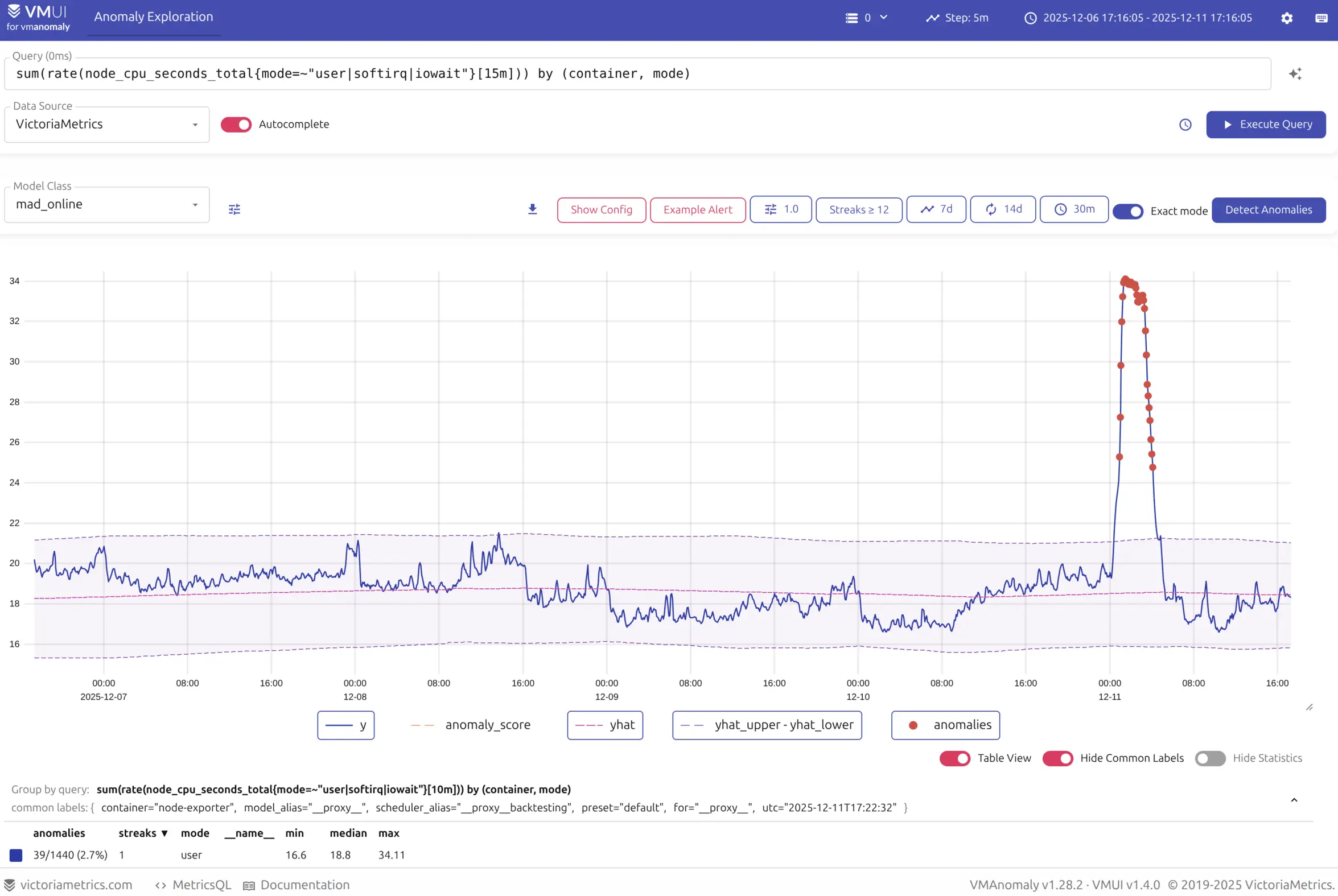
> [!TIP]
Public playgrounds with pre-configured `vmanomaly` instances and VictoriaMetrics/VictoriaLogs/VictoriaTraces datasources are available for interactive experimenting without the need to set up your own instance or getting an enterprise license. You can find them in the [UI documentation](https://docs.victoriametrics.com/anomaly-detection/ui/#playgrounds) or access them directly via the links - [metrics](https://play-vmanomaly.victoriametrics.com/metrics/), [logs](https://play-vmanomaly.victoriametrics.com/logs/), [traces](https://play-vmanomaly.victoriametrics.com/traces/) - or embedded versions in the collapsible blocks.
{{% collapse name="Playground on VictoriaMetrics Datasource" %}}
{{% /collapse %}}
{{% collapse name="Playground on VictoriaLogs Datasource" %}}
{{% /collapse %}}
{{% collapse name="Playground on VictoriaTraces Datasource" %}}
{{% /collapse %}}
### Recommended steps
For optimal service behavior, consider the following tweaks when configuring `vmanomaly`:
- Set `settings.n_workers` {{% available_from "v1.23.0" anomaly %}} [arg](https://docs.victoriametrics.com/anomaly-detection/components/settings/#parallelization) > 1 to utilize more of available CPU cores for parallel workload processing. This can significantly improve performance, especially on larger datasets with a lot of `reader.queries` and longer `scheduler.fit_window` intervals. Setting it to zero or negative number will enable using all available CPU cores.
- Set up [on-disk mode](https://docs.victoriametrics.com/anomaly-detection/faq/#on-disk-mode) {{% available_from "v1.13.0" anomaly %}} to reduce RAM usage, especially for larger datasets. This mode allows `vmanomaly` to keep models and the data on the host filesystem after the `fit` stage, rather than in memory.
- Set up **state restoration** {{% available_from "v1.24.0" anomaly %}} to resume from the last known state for long-term stability. This is controlled by the `settings.restore_state` boolean [arg](https://docs.victoriametrics.com/anomaly-detection/components/settings/#state-restoration).
- Set up **config hot-reloading** {{% available_from "v1.25.0" anomaly %}} to automatically reload configurations on config files changes. This can be enabled via the `--watch` [CLI argument](https://docs.victoriametrics.com/anomaly-detection/quickstart/#command-line-arguments) and allows for configuration updates without explicit service restarts.
**Schedulers**:
- Configure the **inference frequency** in the [scheduler](https://docs.victoriametrics.com/anomaly-detection/components/scheduler/) section of the configuration file.
- Ensure that `infer_every` aligns with your **minimum required alerting frequency**.
- For example, if receiving **alerts every 15 minutes** is sufficient (when `anomaly_score > 1`), set `infer_every` to match `reader.sampling_period` or override it per query via `reader.queries.query_xxx.step` for an optimal setup.
**Reader**:
- Setup the datasource to read data from in the [reader](https://docs.victoriametrics.com/anomaly-detection/components/reader/) section. Include tenant ID if using a [cluster version of VictoriaMetrics](https://docs.victoriametrics.com/victoriametrics/cluster-victoriametrics/) (`multitenant` value {{% available_from "v1.16.2" anomaly %}} can be also used here).
- Define queries for input data using [MetricsQL](https://docs.victoriametrics.com/victoriametrics/metricsql/) under `reader.queries` section. Note, it's possible to override reader-level arguments at query level for increased flexibility, e.g. specifying per-query [timezone](https://docs.victoriametrics.com/anomaly-detection/faq/#handling-timezones) or [sampling period](https://docs.victoriametrics.com/anomaly-detection/components/reader/#sampling-period).
- For longer `fit_window` intervals in scheduler, consider splitting queries into smaller time ranges to avoid excessive memory usage, timeouts and hitting server-side constraints, so they can be queried separately and reconstructed on `vmanomaly` side. Please refer to this [example](https://docs.victoriametrics.com/anomaly-detection/faq/#handling-large-queries-in-vmanomaly) for more details.
> If applicable - consider [`VLogsReader`](https://docs.victoriametrics.com/anomaly-detection/components/reader/#vlogs-reader) {{% available_from "v1.26.0" anomaly %}} to perform anomaly detection on **log-derived metrics**. This is particularly useful for scenarios where log data needs to be analyzed for unusual patterns or behaviors, such as error rates or request latencies.
**Writer**:
- Specify where and how to store anomaly detection metrics in the [writer](https://docs.victoriametrics.com/anomaly-detection/components/writer/) section.
- Include tenant ID if using a [cluster version of VictoriaMetrics](https://docs.victoriametrics.com/victoriametrics/cluster-victoriametrics/) for writing the results.
- Adding `for` label to `metric_format` argument is recommended for smoother visual experience in the [anomaly score dashboard](https://docs.victoriametrics.com/anomaly-detection/presets/#default). Please refer to `metric_format` argument description [here](https://docs.victoriametrics.com/anomaly-detection/components/writer/#config-parameters).
**Models**:
- Configure built-in models hyperparameters according to your needs in the [models](https://docs.victoriametrics.com/anomaly-detection/components/models/) section. Where possible, incorporate [domain knowledge](https://docs.victoriametrics.com/anomaly-detection/faq/#incorporating-domain-knowledge) for optimal results.
- (Optional) Develop or integrate your [custom models](https://docs.victoriametrics.com/anomaly-detection/components/models/#custom-model-guide) with `vmanomaly`.
- Adding `y` to `provide_series` [argument](https://docs.victoriametrics.com/anomaly-detection/components/models/#provide-series) values is recommended for smoother visual experience in the [anomaly score dashboard](https://docs.victoriametrics.com/anomaly-detection/presets/#default). Also, other `vmanomaly` [output](https://docs.victoriametrics.com/anomaly-detection/components/models/#vmanomaly-output) series can be specified in `provide_series`, such as `yhat`, `yhat_lower`, `yhat_upper`, etc. This will allow you to visualize the expected values and their confidence intervals in the dashboard.
> Only [univariate models](https://docs.victoriametrics.com/anomaly-detection/components/models/#univariate-models) support the generation of such output. Other models, such as [multivariate](https://docs.victoriametrics.com/anomaly-detection/components/models/#multivariate-models) or [custom](https://docs.victoriametrics.com/anomaly-detection/components/models/#custom-model-guide), may not support this feature.
**Visualization**:
- Set up [anomaly score dashboard](https://docs.victoriametrics.com/anomaly-detection/presets/#grafana-dashboard) to visualize the results of anomaly detection.
- Set up [self-monitoring dashboard](https://docs.victoriametrics.com/anomaly-detection/self-monitoring/) to monitor the health of `vmanomaly` service and its components.
**Logging**:
- Tune logging levels in the `settings.logger_levels` [section](https://docs.victoriametrics.com/anomaly-detection/components/settings/#logger-levels) to control the verbosity of logs. This can help in debugging and monitoring the service behavior, as well as in disabling excessive logging for production environments.
## Check also
Please refer to the following links for a deeper understanding of Anomaly Detection and `vmanomaly`:
- [High Availability](https://docs.victoriametrics.com/anomaly-detection/scaling-vmanomaly/#high-availability) and [Horizontal Scalability](https://docs.victoriametrics.com/anomaly-detection/scaling-vmanomaly/#horizontal-scalability)
- [State Restoration](https://docs.victoriametrics.com/anomaly-detection/components/settings/#state-restoration)
- [Guide: Anomaly Detection and Alerting Setup](https://docs.victoriametrics.com/anomaly-detection/guides/guide-vmanomaly-vmalert/)
- [FAQ](https://docs.victoriametrics.com/anomaly-detection/faq/)
- [Migration Guide](https://docs.victoriametrics.com/anomaly-detection/migration/)
- [CHANGELOG](https://docs.victoriametrics.com/anomaly-detection/changelog/)
- [UI CHANGELOG](https://docs.victoriametrics.com/anomaly-detection/ui/#changelog)
- [Anomaly Detection Blog](https://victoriametrics.com/tags/anomaly-detection/)